The complete reference
Every feature, in full.
The homepage shows the feeling. This page shows the whole toolbox — every control, option and guarantee, exactly as it works.
01 — The break
A mandala, drawn live.
When a break begins the workspace fades and a line drawing traces itself onto the screen, stroke by stroke. Twelve hand-designed mandalas take their turn, each one drawn in whichever theme, ink and style comes up.
Twelve designs — hand-drawn plots, each one paired with a theme, an ink and a style
Live drawing — strokes trace in real time so there is a rhythm to watch
Nothing to do — no text, no buttons to hunt for — just rest your eyes
Skip or extend — a Skip and a 5 more min control are always one click away (mode permitting)
break ends in 1:48
02 — Schedule
Your rhythm, your rules.
Tune exactly how often breaks arrive and how long they last — from frequent micro-pauses to a single long rest each hour. Set working hours so nothing interrupts before your day starts or after it ends.
Interval
20 min
how long you work between breaks — anywhere up to 8 hours, 0 to turn it off.
Length
~3 min
a long break lasts as long as its mandala takes to draw; the speed slider is what sets it.
Micro-breaks
Off
optional 20-second rests on their own cadence, layered between the longer breaks.
Working hours
9–5
off by default; on, a window and a set of weekdays outside which Mandala never interrupts.
What holds a break back
03 — Smart pause
It knows when not to interrupt.
A break never lands mid-sentence or across a presentation. Mandala watches for the moments that shouldn't be disturbed, waits them out, and takes the screen the instant you are free again.
04 — Palettes
Every ink.
Every palette is hand-tuned and works on paper-white or dark. Pick one, or let Mandala rotate through them.
Classic blue
#85A8FF
Graphite
#CBCBCF
Sepia
#F6B45E
Ocean
#38D5F5
Forest
#57E792
Plum
#E28EFF
Crimson
#FF727E
Ink
#EBEBEF
Gold
#FFD064
Chalk
#F1F3EF
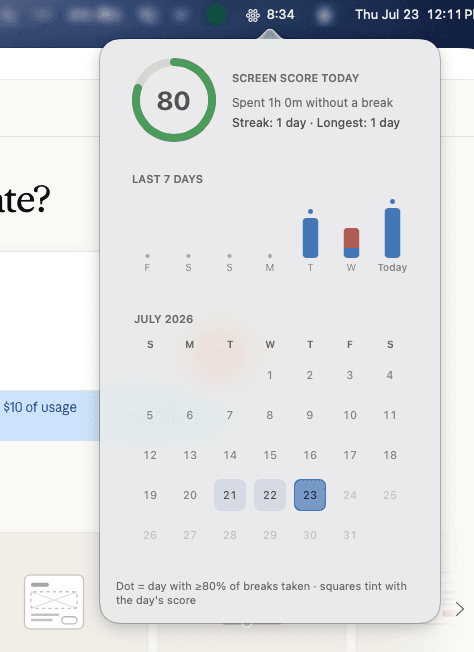
05 — Screen Score
Know your screen time — privately.
A daily score from 0 to 100 rewards taking your breaks and keeping sessions reasonable. See a streak for showing up and a full month of history — all computed on your Mac and exportable as CSV.
6 days
current streak
18 days
longest streak
30 days
of history
CSV
one-click export
06 — Enforcement
As gentle or as firm as you need.
Three modes decide how easy it is to skip a break. Change it any time.
Casual
Skip is there the whole time. A nudge, never a wall.
skip available · 0s
Balanced
Skip appears after a short pause — long enough to actually rest.
skip after · 15s
Hardcore
No skip at all. The break runs its course. You asked for it.
skip disabled
07 — Gallery & wallpaper
Every break, kept.
Each finished mandala is saved — a record of rest, not of work. Set any one as your desktop wallpaper with a single click.
08 — And the rest
Everything else it quietly handles.
Every display
The drawing fills all your connected screens at once, so there is nowhere left to keep working.
Native screensaver
The same hand-drawn line work ships as a macOS screensaver for when you step away from the Mac.
Menu-bar home
Lives quietly in the menu bar with a countdown to your next break and a one-tap “break now”.
Keyboard shortcuts
Trigger, snooze or skip a break from the keyboard without reaching for the mouse.
Launch at login
Starts with your Mac and stays out of the way — no Dock icon unless you want one.
Private by design
Everything is computed on-device. Stats export as CSV; nothing else ever leaves your Mac.
The details
Specifications
- Platform
- macOS 14 Sonoma or later · Apple silicon & Intel
- Break engine
- Original mandala generated per break · live stroke-by-stroke drawing
- Scheduling
- Interval up to 8 h · break length set by the drawing speed · optional micro breaks · working hours
- Smart pause
- Calls, screen sharing, fullscreen video, screen recording, Focus modes
- Enforcement
- Casual · Balanced · Hardcore (no skip)
- Palettes
- 10 hand-tuned inks, on paper or dark backgrounds
- Displays
- Unlimited — breaks span every connected screen
- Stats
- Daily Screen Score 0–100 · streaks · month calendar · monthly trends · CSV export
- Gallery
- Every finished mandala saved · one-click set as wallpaper
- Extras
- Native screensaver · menu-bar app · keyboard shortcuts · launch at login
- Privacy
- Breaks, stats and drawings stay on your Mac; nothing is uploaded
- Price
- 7-day free trial, then $19 one-time — no subscription
Try every feature free.
Seven days, the full app. $19 once, forever after.